
Most "real-time" features only go one way. A queue position changes, an order moves to shipped, a build finishes: the server has news, and the browser needs it now. For that kind of problem, Server-Sent Events (SSE) are usually simpler than WebSockets, and they go further than people expect.
This is how I choose between the two, and what it takes to run SSE in production.
TL;DR#
- Use Server-Sent Events when updates flow one way, from server to browser: notifications, live dashboards, progress bars, queue positions.
- Use WebSockets when both sides send messages constantly: chat, multiplayer games, collaborative editing.
- SSE is plain HTTP. The browser reconnects by itself and resumes from the last event it received.
- In production, turn off proxy buffering, send a heartbeat every 15–30 seconds, and serve the stream over HTTP/2.
What each one actually is#
| Server-Sent Events | WebSockets | |
|---|---|---|
| Direction | Server → browser | Both ways |
| Protocol | An HTTP response that stays open | An upgraded TCP connection (ws://, wss://) |
| Payload | UTF-8 text, usually JSON | Text or binary frames |
| Reconnecting | Built into the browser's EventSource |
Yours to write |
| Proxies, CDNs, auth | Work like any HTTP request | Need upgrade support at every hop |
An SSE stream is an ordinary response with Content-Type: text/event-stream that the server never ends. Each message is a few field: value lines followed by a blank line. The format is part of the HTML standard, and MDN's guide to using server-sent events covers every field.
And long polling, and webhooks?#
Two more names come up in the same conversation, so here are all four side by side:
| Server-Sent Events | WebSockets | Long polling | Webhooks | |
|---|---|---|---|---|
| Who receives it | A browser | A browser or an app | A browser | Another server |
| Connection | One long HTTP response | One upgraded connection | A new request after every update | A new request per event |
| Reconnecting | Built in, with replay | Yours to write | Yours to write | The sender retries |
| Typical use | Live UI updates | Chat, games, editors | Strict proxies, very old clients | Server-to-server: Stripe, GitHub, Twilio |
Long polling is what people did before SSE: the browser asks, the server holds the request until there's news, answers, and the browser asks again. It works anywhere, but every update costs a full request, and the replay logic is yours. Webhooks solve a different problem: they notify a server, not a browser.
The two often work together. Stripe calls your webhook, your API updates the database, and an SSE stream tells the customer's open tab that the payment went through. Stripe webhooks that never double-charge covers the receiving end.
When SSE is the better fit#
- Updates flow one way. Notifications, live dashboards, progress bars, queue positions, prices.
- Clients already talk to you over HTTP. Sending a command stays a normal
POST; only the updates stream. - You want reconnection for free.
EventSourcereconnects by itself and tells the server the last message it saw. - Your infrastructure is HTTP-shaped. Load balancers, auth middleware and request logs keep working.
On Book My Barber, queue changes reach the customer's phone, the barber's dashboard and a TV view on the shop floor over SSE. None of those screens sends anything back on that channel: booking a chair is a regular API call.
A minimal SSE endpoint in Express#
import express from 'express';

const app = express();
const clients = new Set();

const format = ({ id, type, data }) =>
  `id: ${id}\nevent: ${type}\ndata: ${JSON.stringify(data)}\n\n`;

app.get('/events', (req, res) => {
  res.set({
    'Content-Type': 'text/event-stream',
    'Cache-Control': 'no-cache',
    Connection: 'keep-alive',
  });
  res.flushHeaders();

  // After a drop, the browser waits 3 seconds before reconnecting.
  res.write('retry: 3000\n\n');

  clients.add(res);
  req.on('close', () => clients.delete(res));
});

export function broadcast(event) {
  const message = format(event);
  clients.forEach((res) => res.write(message));
}

app.listen(3000);
And in the browser:
const stream = new EventSource('/events');

stream.addEventListener('queue', (e) => {
  renderQueue(JSON.parse(e.data));
});
That's the whole protocol, with no library on either side.
Don't lose events on reconnect#
Connections drop: phones switch networks, laptops go to sleep. When EventSource reconnects, it sends a Last-Event-ID header with the id of the last message it received. Use it to replay what the browser missed:
app.get('/events', async (req, res) => {
  // ...the same headers as above
  const lastId = Number(req.get('Last-Event-ID')) || 0;
  const missed = await eventLog.since(lastId); // Redis, Postgres or an in-memory ring buffer
  missed.forEach((event) => res.write(format(event)));
  clients.add(res);
  req.on('close', () => clients.delete(res));
});
If replaying history is expensive, send a full snapshot when a client connects instead, and treat every later message as a change on top of it. Either way, nobody looks at stale data after a reconnect.
Keep idle connections alive#
Proxies close connections that look idle, often after 60 seconds. Send a comment line every 15 to 30 seconds. EventSource ignores it, but every hop in between sees traffic:
setInterval(() => clients.forEach((res) => res.write(': ping\n\n')), 20_000);
Behind Nginx#
Nginx buffers responses from upstream servers by default, which holds SSE messages back until a buffer fills. Turn buffering off for the stream and raise the read timeout:
location /events {
  proxy_pass http://api;
  proxy_http_version 1.1;
  proxy_set_header Connection '';
  proxy_buffering off;
  proxy_cache off;
  proxy_read_timeout 1h;
}
The app can also send an X-Accel-Buffering: no header to switch buffering off for just that response.
If updates arrive in bursts, or only once the connection closes, the culprit is almost always a buffering proxy, not your code.
More than one server#
The clients set lives inside one process. With several instances behind a load balancer, an update handled by instance A has to reach browsers connected to instance B. Redis pub/sub is the simplest bridge:
import { createClient } from 'redis';

const pub = createClient({ url: process.env.REDIS_URL });
const sub = pub.duplicate();
await Promise.all([pub.connect(), sub.connect()]);

// Every instance relays whatever any instance publishes.
await sub.subscribe('events', (message) => broadcast(JSON.parse(message)));

export const publish = (event) => pub.publish('events', JSON.stringify(event));
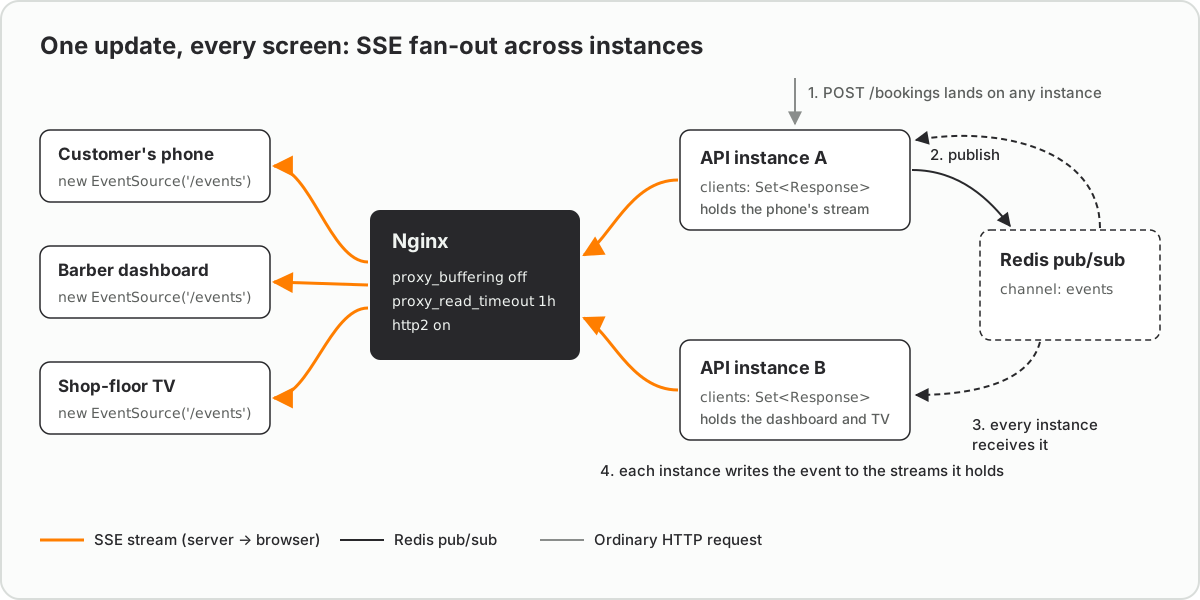
Publish the same event to the log you replay from (the eventLog above), and a browser that reconnects to a different instance still catches up.
Mind the HTTP/1.1 connection limit#
Over HTTP/1.1, browsers allow about six connections per domain, and every open EventSource holds one of them. Open the app in seven tabs and the seventh stalls. Over HTTP/2 the streams share a single connection, and the limit rises to the number of concurrent streams the server allows (128 by default in Nginx). So serve SSE over HTTP/2 (http2 on; in recent Nginx versions), or keep it to one stream per tab.
Authentication and cross-origin streams#
EventSource has no option for custom headers, so you can't send Authorization: Bearer … with it. There are three ways around that:
-
Cookies. A stream on the same origin sends the session cookie like any request. For a stream on another origin, ask for credentials and answer with an exact origin (not
*) andAccess-Control-Allow-Credentials: true:const stream = new EventSource('https://api.example.com/events', { withCredentials: true }); -
A short-lived token in the URL. Issue a one-minute, single-purpose token from an authenticated
POST, then open/events?token=…. Keep it out of your access logs, which record URLs by default. -
fetch()with a streamed body.fetchcan set any header and readresponse.bodyas a stream, but reconnection andLast-Event-IDbecome yours to write again. @microsoft/fetch-event-source does that part.
Whichever you pick, remember that a stream is authorised once, when it opens. If a user logs out or loses access, close their stream on the server. Otherwise it keeps delivering until the connection happens to drop.
Debugging: when the stream misbehaves#
Most SSE bugs have nothing to do with SSE. These are the ones worth recognising on sight:
-
EventSource's response has a MIME type ("text/html") that is not "text/event-stream". Aborting the connection.That's Chrome's console message when the response isn't a stream. The request usually never reached your handler: a single-page app fallback servedindex.html, or an auth layer redirected to a login page. In the Network tab, a healthy stream showstext/event-streamand stays pending. -
Updates arrive in bursts, or only when the stream closes. Something is buffering. Nginx is covered above, but Express's
compression()middleware buffers too, because it needs a window of output to compress well. Its README says to callres.flush()after each write:app.use(compression()); export function broadcast(event) { const message = format(event); clients.forEach((res) => { res.write(message); res.flush(); // added by compression(): send these bytes now }); } -
onmessagenever fires. A message with anevent:field goes only toaddEventListener('<name>');onmessagehandles messages without one. The example above sendsevent: queue, so it needsaddEventListener('queue', …). -
The connection drops at a suspiciously round interval. A proxy or load balancer is closing it as idle. Make the heartbeat shorter than the shortest idle timeout on the path; an AWS Application Load Balancer, for example, closes idle connections after 60 seconds by default (AWS ALB vs Nginx covers where those timeouts live).
-
The seventh tab hangs. That's the HTTP/1.1 connection limit from the previous section.
-
Streams reconnect every few seconds on a serverless platform. A function has a maximum duration, so the platform ends the response,
EventSourcereconnects, and the cycle repeats. Long-lived streams belong on a long-running server or a platform with explicit streaming support.
When to reach for WebSockets instead#
- Both sides talk constantly: chat with typing indicators, multiplayer games, collaborative editing.
- You need binary frames, or very low latency in both directions.
- The browser sends many small messages, where a
POSTfor each one would be wasteful.
For everything else, start with SSE. It's HTTP you already know, the browser handles reconnecting, and you can still add WebSockets later for the one feature that truly needs them.
A quick decision checklist#
- Does the browser send messages on this channel more than every few seconds? WebSockets.
- Do you need binary frames? WebSockets.
- Is the receiver another server rather than a browser? A webhook.
- Must it work through proxies and auth you already have, with nothing new to operate? SSE.
- Is every update something the server learned, that the user only needs to see? SSE.
FAQ#
Are Server-Sent Events better than WebSockets?#
For one-way updates, usually yes. SSE is a plain HTTP response, so it works through existing proxies, load balancers and auth, and the browser reconnects automatically. WebSockets are the better choice when the browser also sends frequent messages, or when you need binary data.
Do Server-Sent Events work over HTTP/2?#
Yes, and they work better there. Over HTTP/2 every SSE stream shares one connection, so the browser's limit of about six connections per domain no longer applies; the server's limit on concurrent streams does instead, which is 128 by default in Nginx.
Why do my Server-Sent Events arrive late or all at once?#
A proxy is almost always buffering the response. In Nginx, set proxy_buffering off for the stream's location, or send an X-Accel-Buffering: no header from the app.
How do I scale Server-Sent Events across several servers?#
Each server only knows the browsers connected to it, so publish every update through a shared channel such as Redis pub/sub, and have each instance relay it to its own clients.
Is Server-Sent Events deprecated?#
No. Server-Sent Events are part of the HTML Living Standard, and EventSource works in every current browser; Edge was the last major browser to add it, in version 79 in January 2020. It's a stable, actively used feature, and it's how many AI APIs stream their responses token by token.
What is the difference between Server-Sent Events and long polling?#
Long polling opens a new request for every update: the server holds it until there's news, answers, and the browser immediately asks again. SSE keeps one response open and writes every update into it, and the browser reconnects and resumes on its own. SSE does the same job with fewer requests and less code.
What is the difference between Server-Sent Events and webhooks?#
Server-Sent Events push updates from your server to a browser over a connection the browser keeps open. A webhook is one server calling another over HTTP when something happens, such as Stripe notifying your API of a payment. They often work together: a webhook updates your data, and SSE shows the change in the open page.
How do I authenticate a Server-Sent Events connection?#
EventSource can't send custom headers such as Authorization. Use a session cookie (with withCredentials: true for another origin), or a short-lived token in the URL that you keep out of your logs. Authorise when the stream opens, and close the stream on the server when the user logs out.