
You don't need Kubernetes to ship without downtime. One Linux server with Docker and Nginx, plus a GitHub Actions workflow, can release an API many times a day with no failed requests, and roll back in seconds when something looks wrong.
Here's the whole setup, piece by piece.
Part of my guide to deploying Node.js to production.
TL;DR#
- Run two copies of the app, blue and green, on one server, with Nginx in front.
- Start the new version on the idle copy, and switch Nginx to it only once its health check passes and reports the new version.
- Reload Nginx, never restart it, so in-flight requests finish on the old workers.
- Roll back by running the same deploy script with an older image tag.
The idea: blue and green#
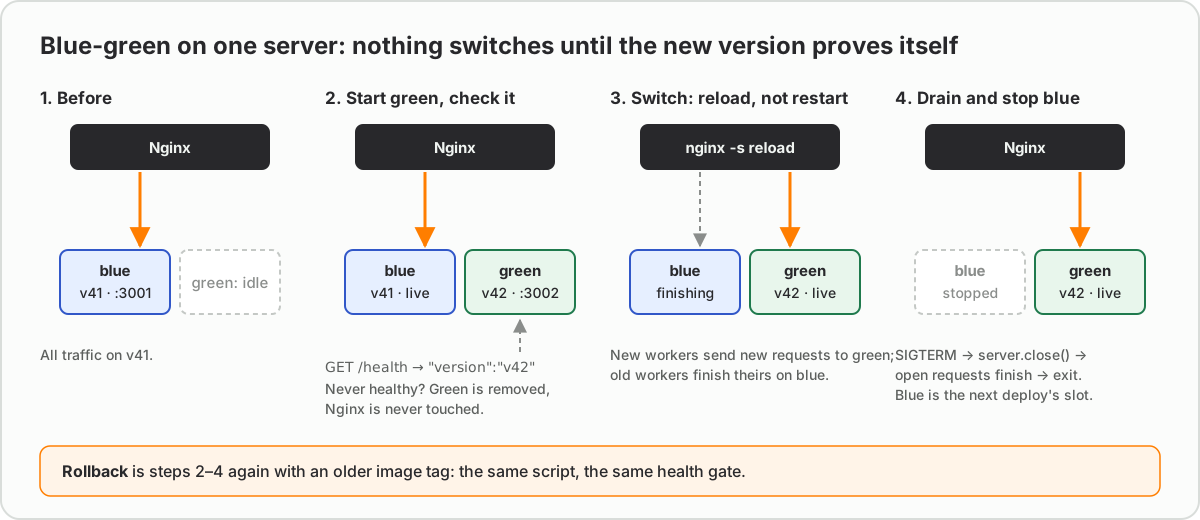
Run two copies of the app: blue on port 3001 and green on port 3002. Nginx sends traffic to whichever one is live. A deploy starts the idle colour with the new image, waits until it's healthy, points Nginx at it and reloads. A reload starts new Nginx workers with the new configuration while the old workers finish the requests they're already serving. Then the old colour stops.
If the new version never becomes healthy, Nginx is never touched and production keeps running the old one.
Blue-green, rolling, or just docker compose up?#
It's worth knowing what this setup is competing with:
| Approach | Downtime | Extra capacity | Rollback | Good fit |
|---|---|---|---|---|
docker compose up -d with a new image |
Yes: the old container stops before the new one is ready | None | The same command with the old tag, with downtime again | Development, internal tools |
| Blue-green on one server (this post) | None, if the switch waits for the health check | Room for two copies during a deploy | Instant: switch back | One server, small teams |
| Rolling update (Swarm, ECS, Kubernetes) | None | One extra copy at a time | Gradual, by the orchestrator | Several servers |
| Canary | None | A small share of traffic | Stop the canary | High traffic, risky changes |
docker compose up -d is where most single-server setups start, and it's the reason they have a few seconds of 502s on every release: Compose recreates the container, so for a moment nothing is listening. Blue-green fixes exactly that gap, without bringing in an orchestrator.
A small, production-only image#
A multi-stage build keeps compilers and dev dependencies out of the image you ship (NestJS Dockerfile: multi-stage builds for production goes through each stage, with pnpm and Prisma variants):
FROM node:22-alpine AS build
WORKDIR /app
COPY package*.json ./
RUN npm ci
COPY . .
RUN npm run build && npm prune --omit=dev

FROM node:22-alpine
WORKDIR /app
ENV NODE_ENV=production
COPY --from=build /app/package.json ./
COPY --from=build /app/node_modules ./node_modules
COPY --from=build /app/dist ./dist
USER node
EXPOSE 3000
CMD ["node", "dist/main.js"]
Use the exec form of CMD, as above. With the shell form, /bin/sh becomes the main process and doesn't pass stop signals on to Node.
A health check that means something#
"The process is running" isn't healthy. Healthy means it can serve a real request:
app.get('/health', async (_req, res) => {
  try {
    await db.query('SELECT 1');
    res.json({ status: 'ok', version: process.env.APP_VERSION });
  } catch {
    res.status(503).json({ status: 'unavailable' });
  }
});
Returning the version lets the deploy script check that the new build is the one answering.
Finish what you started#
When Docker stops the old container it sends SIGTERM, then SIGKILL ten seconds later. Stop accepting new connections and let the open requests finish:
process.on('SIGTERM', () => {
  server.close(() => process.exit(0));
  setTimeout(() => process.exit(1), 9_000).unref();
});
Nginx: one small file decides what's live#
# /etc/nginx/conf.d/api.conf
upstream api {
  include /etc/nginx/upstream/api-live.conf;
  keepalive 32;
}

server {
  listen 80;
  server_name api.example.com;

  location / {
    proxy_pass http://api;
    proxy_http_version 1.1;
    proxy_set_header Connection '';
    proxy_set_header Host $host;
    proxy_set_header X-Forwarded-For $proxy_add_x_forwarded_for;
  }
}
api-live.conf holds a single line, such as server 127.0.0.1:3001;. Switching colour means rewriting that line and reloading Nginx. This config is plain HTTP for brevity; Nginx reverse proxy for Node.js with free SSL adds the HTTPS, headers and hardening.
The deploy script#
This lives on the server as /srv/api/deploy.sh and takes the image tag to release:
#!/usr/bin/env bash
set -euo pipefail

TAG="$1"
IMAGE="ghcr.io/acme/api:$TAG"
LIVE_FILE=/etc/nginx/upstream/api-live.conf

if grep -q 3001 "$LIVE_FILE"; then NEXT=green; PORT=3002; OLD=blue; else NEXT=blue; PORT=3001; OLD=green; fi

docker pull "$IMAGE"
docker rm -f "api-$NEXT" 2>/dev/null || true
docker run -d --name "api-$NEXT" --restart unless-stopped \
  --env-file /srv/api/.env -e APP_VERSION="$TAG" \
  -p "127.0.0.1:$PORT:3000" "$IMAGE"

# Give the new container up to 60 seconds to report healthy, on the new version.
for _ in $(seq 1 30); do
  if curl -fsS "http://127.0.0.1:$PORT/health" | grep -q "\"version\":\"$TAG\""; then
    echo "server 127.0.0.1:$PORT;" > "$LIVE_FILE"
    sudo nginx -t && sudo nginx -s reload
    docker stop "api-$OLD" 2>/dev/null || true
    echo "Live on $NEXT ($TAG)"
    exit 0
  fi
  sleep 2
done

echo "The new version never became healthy. $OLD stays live." >&2
docker logs --tail 50 "api-$NEXT" >&2
docker rm -f "api-$NEXT"
exit 1
Run it as a deploy user that is in the docker group, owns /etc/nginx/upstream/, and may run exactly nginx -t and nginx -s reload through sudo (one line in /etc/sudoers.d/). If the image is private, log the server in to the registry once with docker login ghcr.io.
The GitHub Actions workflow#
Build once in CI, tag the image with the commit, then ask the server to release that exact tag:
name: Deploy

on:
  push:
    branches: [main]

concurrency:
  group: production
  cancel-in-progress: false

jobs:
  deploy:
    runs-on: ubuntu-latest
    permissions:
      contents: read
      packages: write
    steps:
      - uses: actions/checkout@v4

      - uses: docker/setup-buildx-action@v3

      - uses: docker/login-action@v3
        with:
          registry: ghcr.io
          username: ${{ github.actor }}
          password: ${{ secrets.GITHUB_TOKEN }}

      - uses: docker/build-push-action@v6
        with:
          push: true
          tags: ghcr.io/acme/api:${{ github.sha }}
          cache-from: type=gha
          cache-to: type=gha,mode=max

      - name: Release on the server
        uses: appleboy/ssh-action@v1
        with:
          host: ${{ secrets.DEPLOY_HOST }}
          username: deploy
          key: ${{ secrets.DEPLOY_KEY }}
          script: /srv/api/deploy.sh ${{ github.sha }}
The concurrency group queues deploys instead of letting two run at once, and the layer cache means a change to one source file rebuilds only the last layers.
Database migrations#
For a few seconds during every switch, both versions serve traffic, so each migration has to work with the old code and the new. Split breaking changes in two: first expand (add the new column and write to both), deploy, then contract (drop the old column) in a later release. Running database migrations safely in CI/CD covers the rest: where to run them, and which changes lock tables.
Rolling back#
Every image is tagged with its commit, so rolling back is the same script with an older tag. Pass the full SHA, since that's what the workflow tags with (github.sha); a short one like 3f9c2ab won't match any image:
/srv/api/deploy.sh 3f9c2ab8d41e6c07b2f95a1e0c3d7b48e9f6a215
It runs the same health check and the same switch. Nothing new to learn at 2 a.m.
Prove it's zero-downtime#
"Zero downtime" is a claim, so test it the way users would notice: keep requests flowing while you deploy, and count the failures. oha prints a status-code breakdown at the end:
# Terminal 1: 20 requests a second for 2 minutes, through Nginx, like real traffic.
oha -z 2m -q 20 https://api.example.com/health

# Terminal 2, while that runs: deploy the next tag.
/srv/api/deploy.sh "$NEXT_SHA"
Every response should be a 200. Run the same test against a plain docker compose up -d release first, to see the gap this setup closes.
Common mistakes, and the errors they print#
502s right after the switch, with this in Nginx's error log:
connect() failed (111: Connection refused) while connecting to upstream
Nginx was pointed at a port where nothing was listening yet. Either the switch didn't wait for the health check, or the app inside the container listens on 127.0.0.1 instead of 0.0.0.0, so Docker's port mapping can't reach it. Bind to all interfaces inside the container; the -p 127.0.0.1:PORT:3000 mapping already keeps it off the public internet.
Random 502s, not only during deploys:
upstream prematurely closed connection while reading response header from upstream
That's a keep-alive race. Nginx reuses idle upstream connections for up to 60 seconds by default (keepalive_timeout in the upstream module), but Node closes idle keep-alive sockets after 5 seconds (server.keepAliveTimeout). If Node closes a socket just as Nginx sends the next request on it, that request fails. Make Node wait longer than Nginx, or Nginx give up sooner:
server.keepAliveTimeout = 65_000; // longer than Nginx's 60 s
docker stop always takes exactly ten seconds. The process never saw SIGTERM, so Docker waited out its grace period and killed it with SIGKILL, mid-request. The usual cause is a shell-form CMD, which makes /bin/sh the main process; Docker's docs explain the exec and shell forms.
Open streams are cut when the old container stops. Long-lived connections, such as Server-Sent Events or WebSockets, stay on the old container after the switch until it stops. Clients have to reconnect, and they'll land on the new version. EventSource does that by itself; Server-Sent Events vs WebSockets covers resuming without losing events.
Two deploys overlap. Two pushes a minute apart can run the script twice, each picking a colour from a file the other is rewriting. The workflow's concurrency group above queues them (GitHub's docs).
nginx: [emerg] host not found in upstream. If your upstream uses a container name instead of 127.0.0.1:PORT, Nginx resolves it when it loads the configuration, and fails if that container doesn't exist. The script's nginx -t catches this before the reload, which is exactly why it's there.
Checklist#
- The image is built once, in CI, and tagged with the commit
-
/healthchecks real dependencies and reports the version - The app handles
SIGTERMand drains its connections - Nginx reloads; it never restarts
- A failed health check leaves the old version live
- Migrations work with both the old and the new version
FAQ#
Can you deploy with zero downtime without Kubernetes?#
Yes. One Linux server running Docker and Nginx can do a blue-green deploy: start the new container next to the old one, wait for it to pass a health check, switch Nginx's upstream and reload, then stop the old container.
What is a blue-green deployment?#
Two identical copies of an application, called blue and green, where only one receives traffic at a time. A release goes to the idle copy, and traffic switches over once it is healthy, so the previous version stays ready as an instant fallback.
Does reloading Nginx drop connections?#
No. nginx -s reload starts new worker processes with the new configuration, and the old workers finish the requests they are already serving before they exit. A restart stops Nginx completely, which is why a deploy should only ever reload it.
How do database migrations work with blue-green deploys?#
Both versions serve traffic for a few seconds during the switch, so every migration has to work with the old code and the new. Split breaking changes into an expand release that adds the new structure, and a later contract release that removes the old one.
Does docker compose up -d cause downtime?#
Yes, when it replaces a running service. Compose stops and recreates the container, so there's a gap between the old one stopping and the new one accepting requests. To avoid it, run two copies and switch the proxy between them after a health check, or use an orchestrator's rolling update.
What is the difference between blue-green and rolling deployments?#
A blue-green deploy runs a complete second copy of the new version and switches all traffic to it at once, keeping the old copy as an instant fallback. A rolling deploy replaces instances a few at a time, so old and new versions serve traffic together for longer, and it needs several instances to work.
How long does a blue-green deploy take?#
About as long as pulling the image, starting the app and passing its health check; the switch itself is a single Nginx reload. Building the image in CI with a layer cache, and keeping startup work small, keep the whole release short.